
How to trade Trion
Scope. This illustrated walkthrough covers the V2 pool desk: the two CMPT series issued by the writer sleeve and traded in the secondary pool, live until their 2026-10-30 expiry. Options V3, the order book where you buy and write any listed strike and expiry at your own price, is described on the Options page and, step by step, in Getting started.
Buy an option, sell one you own, or back the writer sleeve. Three different actions, one desk. This walkthrough uses a CMPT capped call; a put works the same way after you pick the put contract.
Prefer paper? Open the five-sheet illustrated print guide and use your browser's Print command (US Letter, portrait, 100%).
The desk opens in Simple: an index chart, one Buy/Sell ticket and your positions. Use Simple | Advanced in the ticker strip to switch without reloading your market data; your choice is remembered on this browser. Advanced adds the order book, analysis panels, detailed quote controls and Swap, LP, Writer and Settle tabs used in the walkthrough below.
Before you start: the units
| What the desk shows | What it means |
|---|---|
| CT | Whole option contracts. 1 CT = 1 contract. Enter 0.5 for half a contract. Six decimals max. |
| USDG | Collateral and premium currency, six decimals. |
| Strike / Cap / Floor | Index levels in USD per GPU-hour. A CALL pays when the expiry fixing settles above the strike, up to the cap. A PUT pays when it settles below the strike, down to the floor. |
| Max payout / CT | Cap − strike (call) or strike − floor (put). The most a contract can ever pay. |
| Contract tiles | Green = CALL, red = PUT. Each tile is one exact strike, cap/floor and UTC expiry. |
| FLAT shares | Writer ownership shares in the sleeve. Redemption takes a raw whole integer of shares. |
Connect your wallet on Robinhood Chain, keep a little ETH for gas, and read every wallet prompt: an approval lets a contract spend, it is not a completed trade.
1. Buying a call or put
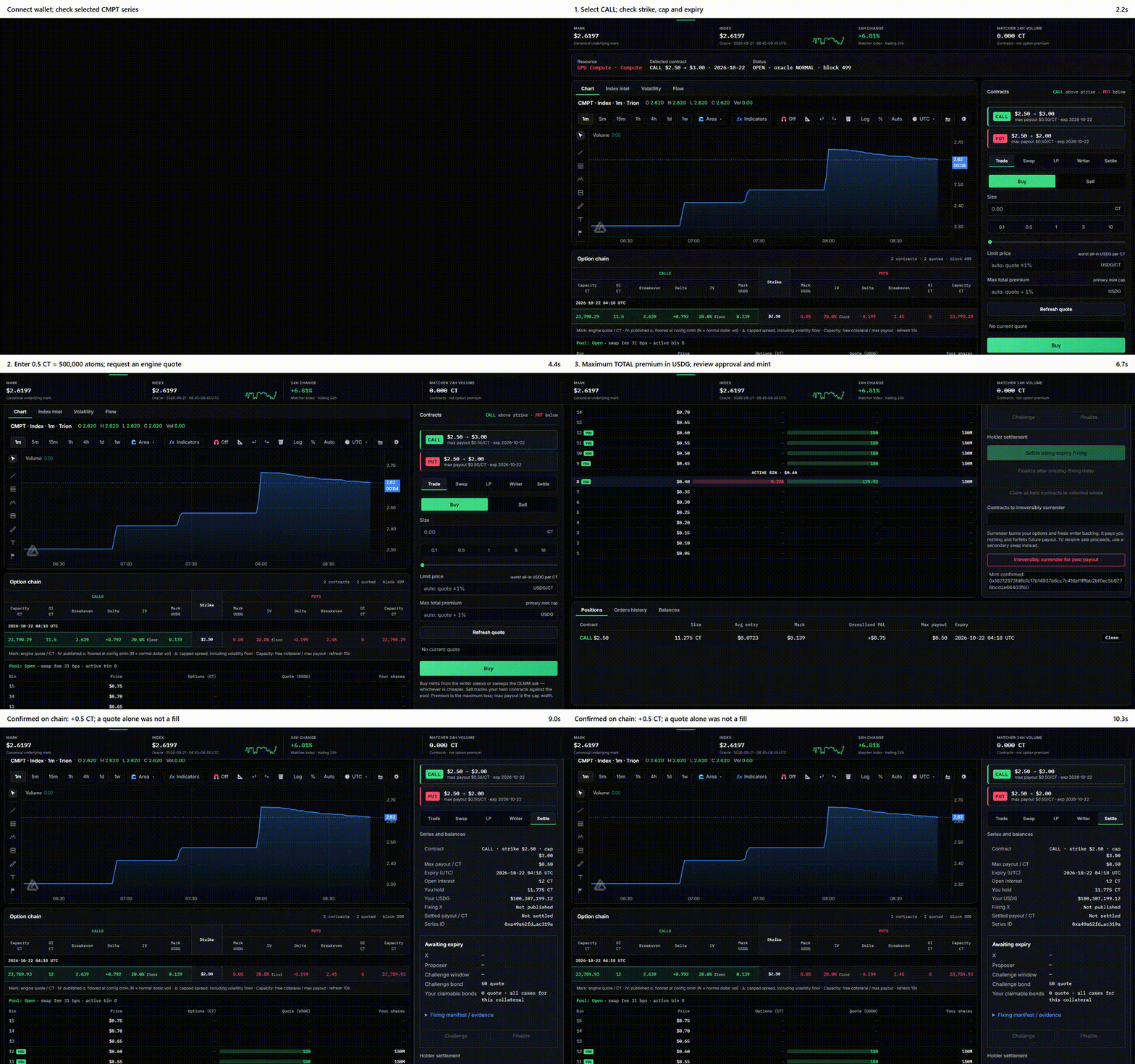
- Open CMPT options and click a contract tile. Read the strike, cap/floor and expiry on the tile — that is what you are buying.
- In Trade, enter a size in Contracts or tap a quick-size chip. The engine quote refreshes as you type: Premium (total), Ask per CT, Max payout per CT, Breakeven index and the quote's validity.
- Max total premium is prefilled at quote + 1%. It is the most the whole purchase may cost. Lower it if you want tighter protection; a fill above it fails safely.
- Press Buy. Approve USDG, then confirm the mint. The desk re-reads the quote, checks your cap and expiry, simulates, and waits for the receipt. You hold updates when the mint is confirmed.
A quote is not a fill until the receipt lands. Premium is the maximum you can lose on a bought option; payout is capped at the tile's max payout.
Two different limits
| Action | You enter | Protection |
|---|---|---|
| Buy from the sleeve (Trade) | CT | Max total premium in USDG for the whole order |
| Buy in the pool (Swap) | USDG to spend | Worst all-in price — max USDG per CT |
| Sell in the pool (Swap) | CT to sell | Worst all-in price — min USDG per CT |
2. Selling back
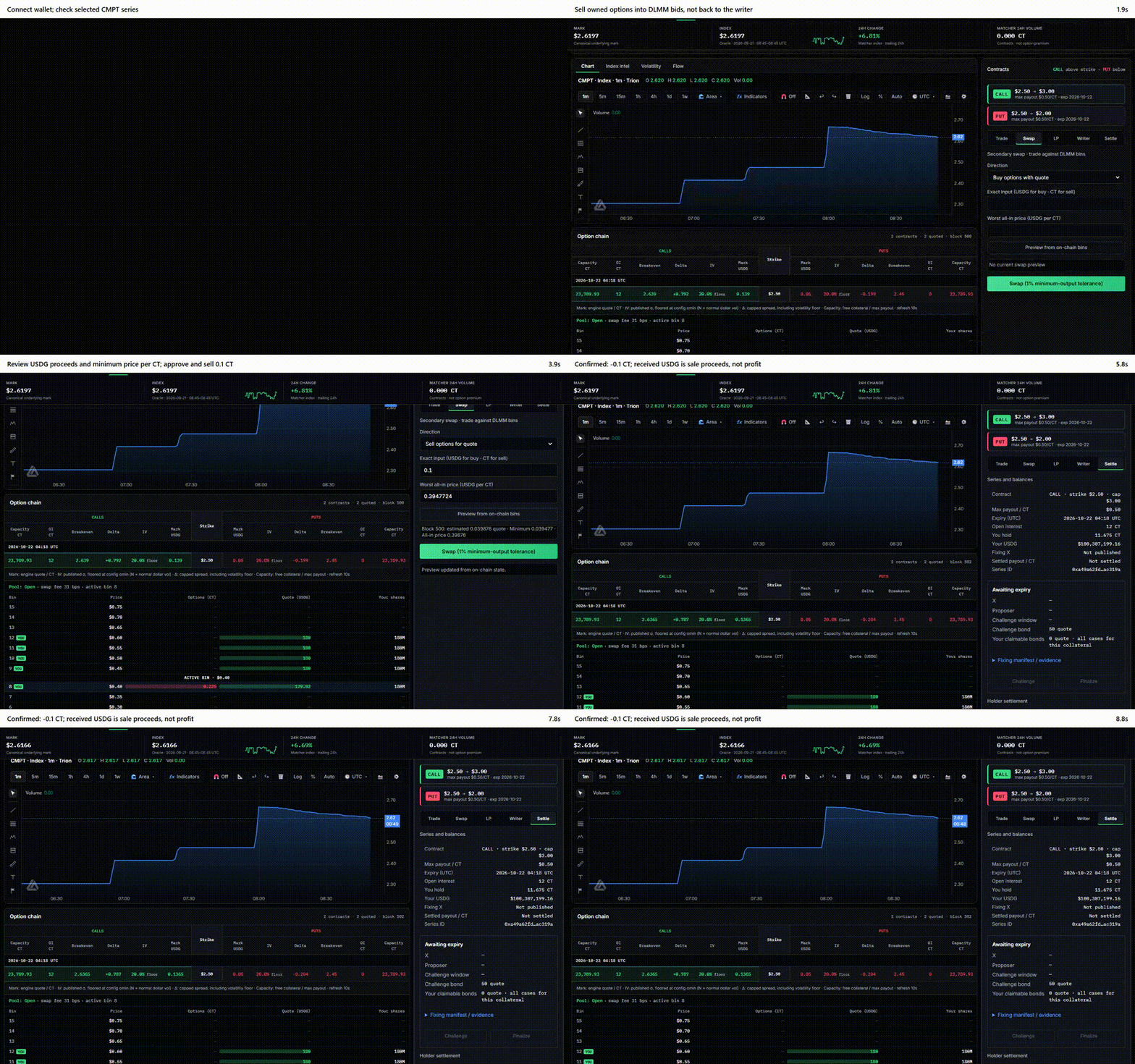
- With the contract you own selected, open Swap and set Direction to Sell options for quote.
- Exact input is CT (0.1 = a tenth of a contract). Worst all-in price is the minimum USDG per CT you accept.
- Preview from on-chain bins walks up to 32 bins of the pool and shows estimated proceeds, minimum output and the all-in price including the pool fee.
- Swap submits at 99% of the fresh estimate as the minimum output, still bounded by your price limit.
The ladder on the desk shows the pool's depth: Options (red) are contracts offered for sale, Quote (green) is USDG bidding for contracts. No green in the ladder means no buyer right now — a preview cannot sell into empty bins, and the desk never leaves a resting order for you.
Surrender is not a sale. It burns your option for zero payout and frees writer backing. Use Swap to sell.
3. Writing — backing the sleeve
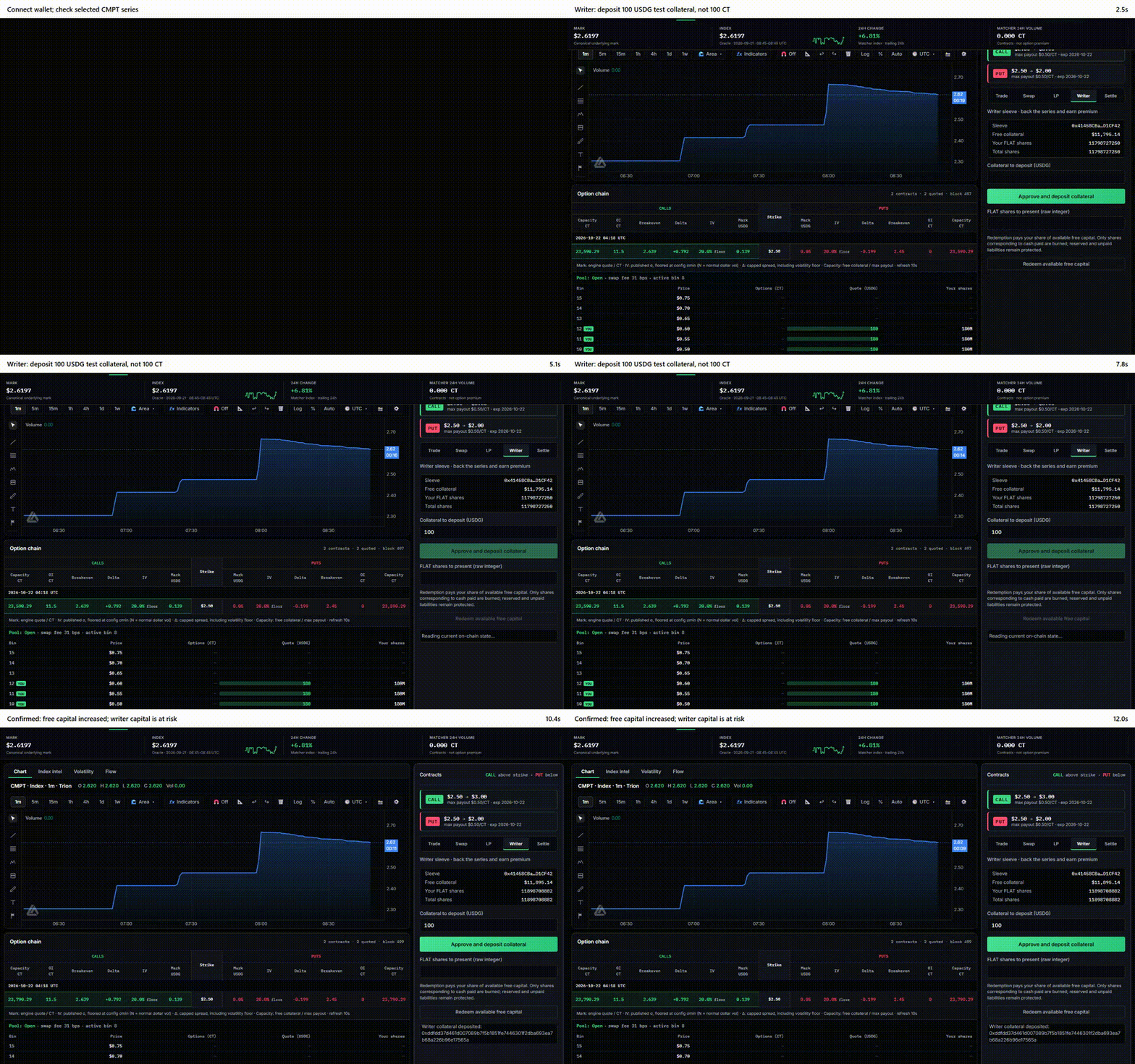
- Open Writer. The sleeve backs every series for that market and expiry.
- Enter USDG in Collateral to deposit (this is capital, not contracts) and press Approve and deposit collateral.
- Free collateral, Your FLAT shares and Total shares update on confirmation.
Writers earn the premiums buyers pay and owe the payouts at expiry. Every contract is fully collateralized, so the sleeve can never owe more than it holds — but writer capital is at risk and can be lost in full if the index settles against the sleeve's book. Reserved backing and unpaid claims cannot be withdrawn until they are released.
To take capital out, enter FLAT shares in FLAT shares to present and press Redeem available free capital. Only the shares corresponding to cash actually paid are burned.
Pool liquidity (DLMM bins under LP) is a separate role from writing; LP shares and FLAT shares are not interchangeable.
4. Settlement: fixing → challenge → final → claim
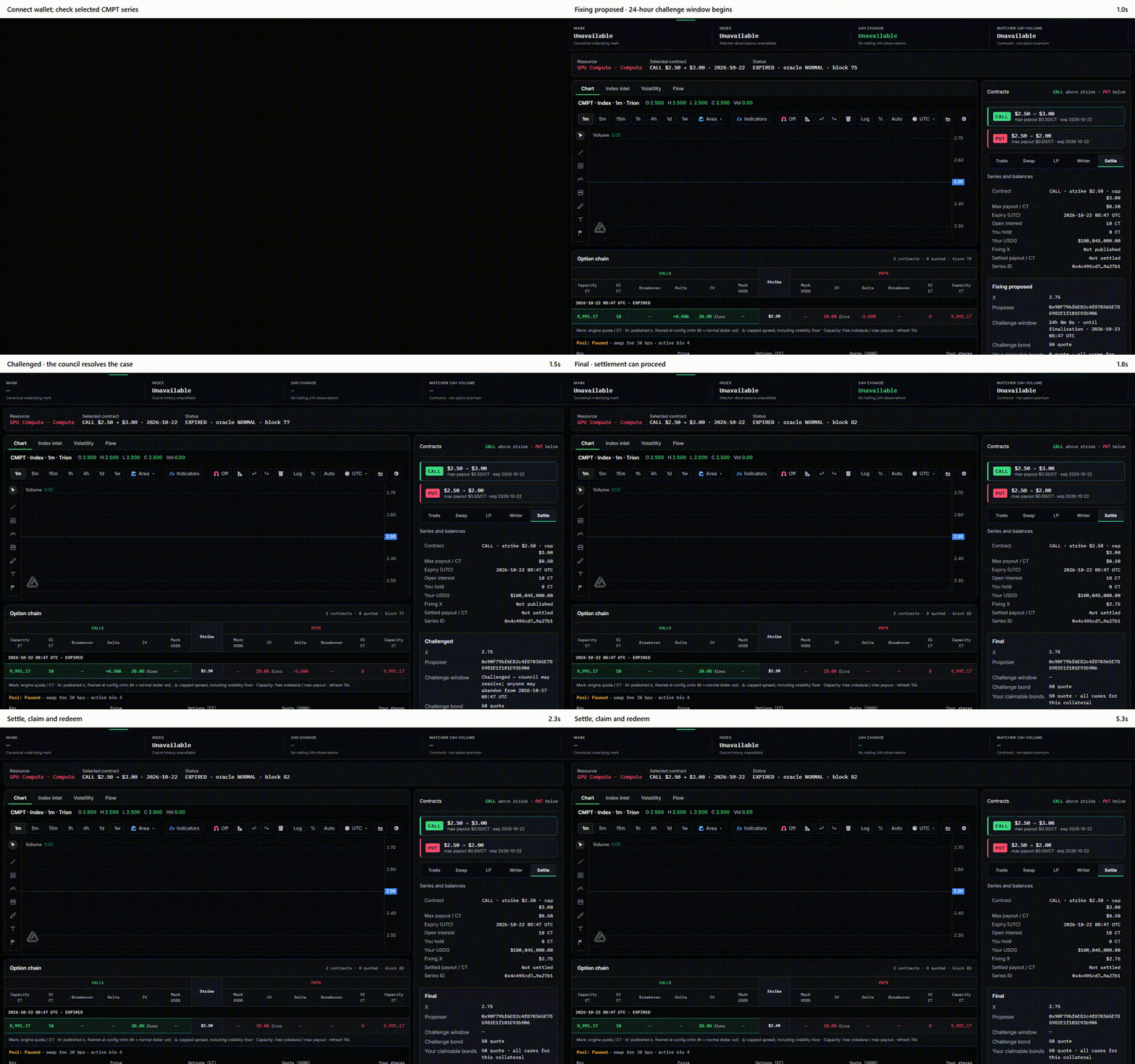
The live index on the chart is not the settlement price. Trading closes 24 h before expiry (2026-10-29 08:00 UTC for the first series), and that last 24 hours is the averaging window: the fixing X is the 24 h time-weighted average of the published CMPT index, sampled every five minutes in the window ending at expiry (288 samples, each of which must satisfy the live-index quorum), computed under the contract's frozen source recipe, with evidence hashes and public archive links for every observation. The Settle tab shows every step.
| Panel state | What it means |
|---|---|
| Awaiting expiry | Trading is open; settlement is not. |
| Fixing proposed | The relayer posted the fixing with a 100 USDG bond. Read X, the proposer, and the Fixing manifest / evidence. A 24-hour challenge window starts. |
| Challenge | Anyone who can show the fixing is wrong posts a 50 USDG bond and a public, signed dispute. One challenge per fixing. |
| Challenged | The five-seat council votes. Three matching ballots uphold (challenger loses the bond), correct the fixing (proposer loses the bond to the challenger) or cancel it. |
| Final / Corrected | Unchallenged after 24 h → anyone presses Finalize. Challenged → the council's resolution finalizes it. |
| Settle | Locks the series payout per contract from the final fixing. |
| Claim | Burns your contracts in the selected series and pays the payout to your wallet. |
Bonds that are refunded or won are credited as claimable balances — Withdraw claimable collects them.
If no fixing can be produced, the series enters the fallback path after expiry + 72 h (a pending fixing blocks it until resolved). See options for the exact rules.
5. Risks
- Buyer: premium and gas can be lost entirely; payout is capped.
- Writer: premiums may not cover payouts; capital can be lost in full and is locked while exposure is open.
- Exit liquidity: the pool only buys what someone has bid for. A preview is not a fill, and you cannot trade during the 24 h averaging window before expiry.
- Oracle and governance: fixings can be challenged, corrected or delayed. At launch, governance and all five council seats are held by Trion. The contracts are not independently audited.
- Software and collateral: smart-contract, wallet, network and stablecoin-issuer risk remain. Full collateralization removes counterparty leverage risk, not these.
Questions on any field: every input has its unit next to it, and every state on the desk names the next action.
Repository-owned documentation · September 2026 · Educational material, not investment advice and not an audit.